


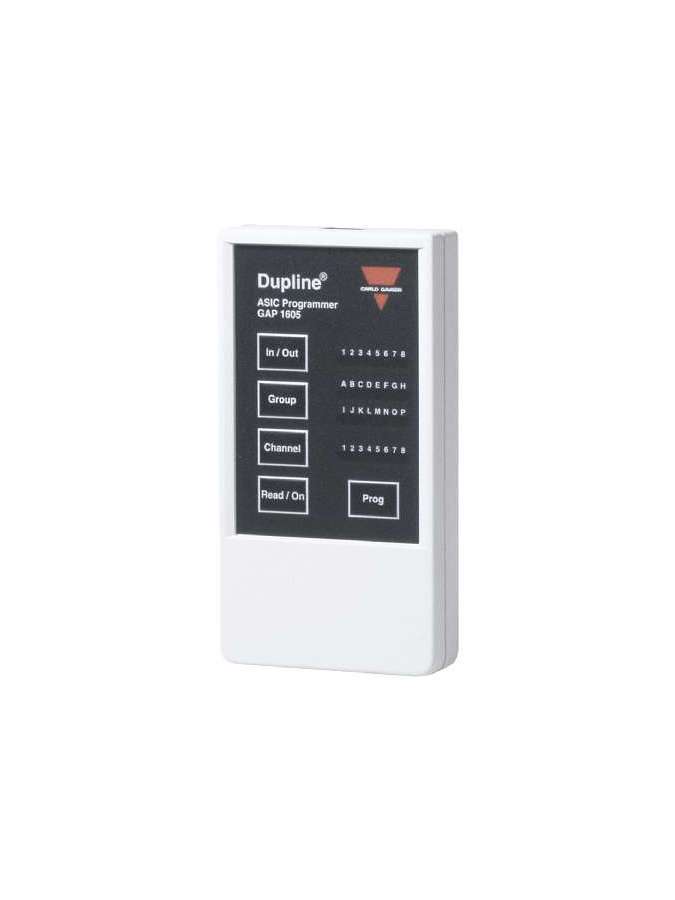
GAP1605, Programming Unit Model GAP 1605, GAP1605, Programming Unit for Dupline G..(..) .... ASIC design. Provides the means to read and program the channel codes. Coding of the Ent/Outputs as 2, 4 and 8 consecutive channels or individually for each Ent/Output. Unused Ent/Outputs can be defined as uncoded inputs/outputs., GAP1605, GAP 1605 is the portable programming unit used for reading and programming the channel codes of Dupline devices based on ASIC design (Ordering data type G..... ). Once the 9 V alkaline battery is installed, the GAP1605 unit is ready for use by connecting the cable between the GAP1605 unit and the Dupline device to be programmed. The GAP1605 has 5 keys: - two for reading and programming - two for changing the Group ( A, B, C ...O, P) and Channel number (1, 2, 3 ... 7, 8) and - one for selecting the selected Input / Output The current coding of a Dupline device is displayed through 4 rows of 8 LED's. - the top row of LED's indicates the selected Input / Output of the device (1, 2, 3 ....7, 8) - the two middle rows indicate the Channel Group (A , B , C ...O , P) - the bottom row indicates the Channel Number (1, 2, 3 ... 7, 8) "In / Out" key (Inputs / Outputs) This key is used to scroll through the Inputs / Outputs of a Dupline device. It is also used to program in Groups (A, B, C ...O, P) or individually (A1, B2, C1 ..) the Inputs / Outputs, for which it must be pressed for 2 seconds and it will change from programming in Groups to individual and vice versa. Group" key Changes the previously selected channel group from A to P. The LED indication will move one place to the right each time this key is pressed. Channel" key Changes the previously selected channel number from 1 to 8. The LED indication will move one place to the right each time this key is pressed, provided that the channel programming is done individually, if the channel programming is done by groups, pressing this key does not change anything. Read / On key This key is used to switch on the GAP1605 and to read the channel codes of the connected Dupline equipment. When the read is complete, the LED's will indicate the equipment configuration. If the GAP1605 is not connected to a Dupline device it will disconnect within 2 seconds. When the information on the LED's corresponds to the desired channel configuration, this information is stored in the Dupline device by pressing the Prog key. When programming is complete, a check is performed; if this check fails, all activated LED's will flash twice and the GAP1605 will switch off. If this situation occurs repeatedly in the same unit, it is possible that the unit is faulty. If several devices fail, the GAP1605 may be faulty. Individual programming of Inputs / Outputs By pressing the "In / Out" key for 2 seconds, the group programming mode will change to individual programming. The "In / Out" key is then used to select one of the eight possible Inputs / Outputs and code each of them individually. In individual programming mode it is also possible to deactivate Inputs / Outputs by simply pressing and holding the "Channel" key when passing through channel 8, so that both the Channel LED and the Group LED go out. If you want to activate any Input / Output again, just press the "Channel" key again. In a Dupline device with 8 Inputs / Outputs, all or only part of the Inputs / Outputs can be programmed. The individual programming mode is also valid for coding the transceiver units (Transmitters and Receivers in the same unit). To exit the individual programming mode, just press the "In / Out" button for 2 seconds and you will go to the Group programming mode. Setting the output status In the receivers you can configure the status of the outputs during a Dupline transmission failure (cut of the 2 wires, transmission failure, etc...), the factory setting in the event of a Dupline transmission failure, the factory setting in the event of a Dupline transmission failure.), the factory setting in case of transmission failure is for the output(s) of the receivers to go to OFF, but in some cases the reverse signal is desirable (for example in lighting applications, turn on the light if the Dupline is faulty) To change the status of the output the following steps must be followed : 1st Disconnect the GAP1605 from the Dupline 2nd Hold down the "In / Out" and "Group" buttons simultaneously and then press the "Read / On" button The first LED in the "In / Out" display will light up; then connect the GAP1605 to the Dupline (to the receiver whose output status you want to change) and press the "Read / On" button, if the output status is set to ON the first Channel LED will light up, pressing the "Channel" button will change the output status from ON to OFF and vice versa; press "Prog" to save the selection made. If "Read / On" is pressed when the GAP1605 is not connected to the Dupline network, the LED's will flash to indicate the faulty working condition; this fault is cleared within 30 seconds after switching off the GAP1605. Other functions The Dupline devices can be encoded both when connected to the Dupline and when not connected to the Dupline line and even without auxiliary power supply of the Dupline device to be encoded. If the device is encoded when it is connected to the Dupline, the device is automatically disconnected from the Dupline (yellow LED goes out) and returns to normal operation after the GAP1605 is disconnected.

No customer reviews for the moment.
Or Insert your account information:




 GAP1605.pdf

