



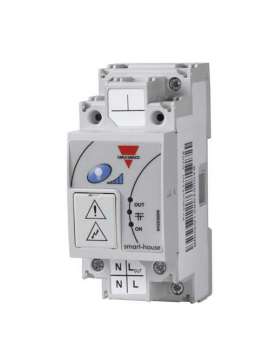
SH2D500W1230, Dimmer up to 500 W Model SH2D500W1230, SH2D500W1230, This 500 W universal dimmer is designed for DIN rail mounting. This universal dimmer is suitable for dimming resistive, inductive and capacitive loads as well as LED lamps (see LED lamp table). The maximum load of type R, L and C is 500 W depending on temperature; the dimming is described according to the trend of the "dimming curve" diagram. The dimmer automatically detects whether the connected load is resistive, capacitive or inductive, but in the case of an LED lamp, the user must select the appropriate curve as described below. The dimmer is fully programmable via the smart-house tool. The technology used allows the dimmer to be electrically protected against short-circuit, overload and overtemperature. Thanks to the internal bus, it can be easily connected to other adjacent dimmers (see "connection diagram") without wiring the Dupline® BUS. In addition, the integrated heat sink allows to install adjacent dimmers without load reduction due to temperature increase., SH2D500W1230, Operating mode If the SH2D500W1230 is connected to the Dupline® bus and the bus is working properly, the dimmer is in STANDARD mode and the green LED is on. The dimmer enters LOCAL mode if the push button is pressed or if there is a bus failure or if it is not connected. In LOCAL mode, the dimmer does not support any command from the bus and the LED will blink. The dimmer can return to STANDARD mode only when the bus status is correct and one of the following events occurs: 1) Immediately after the return of the Dupline® bus 2) After a timeout of 1 minute after pressing a button 3) After restarting the power supply. Push button Bus connected The push button can be used with short or long presses (>2 seconds); the press puts the dimmer in LOCAL mode. Short press: the light is switched on/off (switching function) with the set value. The factory setting is 100%, so the first time the button is pressed with a short press, the light switches on at 100%. If the module memorises another lighting scene, the light will switch on at that level. Long press: once the light is on, if the button is held down for more than 2 seconds, the light will increase to 100% and decrease to 5%. This will repeat as long as the button is held down. Each time the push button is pressed, the ramp will reverse. Bus not connected or bus fault. If the bus is not connected or if there is a bus fault, the pushbutton overwrites the safe state in case of fault with the behavior described above. No addressing is required, as the module is equipped with a specific identification number (SIN). The user only has to enter the SIN number in the configuration tool when creating the system configuration. Faulty lamp detection If the measured current is less than 20 mA, the relay module provides a faulty load message (the connected lamp may be broken). This information is sent to the Sx2WEB24, which alerts the user via the SH tool, web server, e-mail, SMS, etc. Safe status in case of failure The output status of the dimmers, if the Dupline® bus is disconnected or if there is a bus failure, is programmed via the SH tool and the user can choose between the following options: 1. Output always deactivated 2. The output maintains the status it had before disconnection. By default, the factory setting is deactivated. Equipment short-circuit protection As described in the "Lighting circuit design", if more than one capacitive transformer is to be connected in parallel for a total load of more than 180 W at 20°, the equipment short-circuit protection must be deactivated. This protection must be deactivated via the SH tool, as described below under "Programming". If the equipment short-circuit protection is activated, it is always active, whether the output is activated or deactivated. If the protection is disabled, it will only be active when the load is off; in this situation, care must be taken to avoid short circuits when the output is active, otherwise damage to the dimmer will occur. Programming The SH2D500WE230 dimmer is fully programmable through the SH tool and the programmable parameters are as follows: 1) Ramp time. This is the time the dimmer takes to switch the light from 0% to 100% (and from 100% to 0%). It can be adjusted from a minimum of 2 seconds to a maximum of 27 seconds 2) Load type. This dimmer supports: - RLC load (RLC curve); e.g. incandescent halogen lamps - Dimmable LED lamps with trailing edge curve (P1 curve) - Dimmable LED lamps with leading edge curve (P2 curve) - Dimmable LED lamps with leading edge curve and no soft start (P2 curve) For more information, see the section dedicated to dimming LED lamps. 3) Safe state in case of failure. The user can program the three different behaviours described above. - Output always off - Output always on - The output maintains the status it had before switching off. 4) Short-circuit protection. The user can activate/deactivate the equipment protection against short circuits. 5) Scenario change enabled. With this option, the user can block the scenario change of a dimming function (e.g. in hotels, public places, etc.). 6) Scenario saving enabled (unlocked). With this option, the user can block the saving of a scenario of a dimming function. 7) Soft start ramp. With the SH tool, the user can define a different soft start ramp for each scenario. The soft start can be programmed from 1 to 31 seconds. 8) Soft off ramp. With the SH tool, the user can define a different soft shutdown ramp for each scenario. The soft off can be programmed from 1 to 31 seconds. The SH2D500W1230 dimmer can also be used in combination with any of the LUX smarthouse sensors in dimming functions with constant light programming.

No customer reviews for the moment.
Or Insert your account information:




 SH2D500W1230.pdf

