



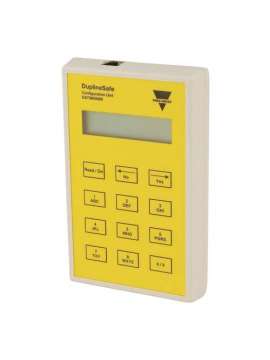
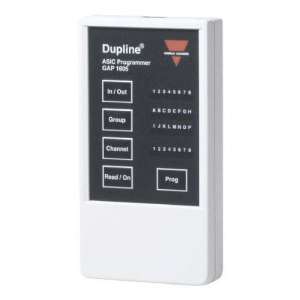
GS73800080, DuplineSafe Configuration and Test Unit Type GS 7380 0080, GS73800080, Configuration and Test Unit for DuplineSafe. Configures the DuplineSafe safety relay output module, GS38300143230, and the DuplineSafe safety input module, GS75102101. Controls the DuplineSafe bus in the unit's test mode. Highly recommended for commissioning, troubleshooting and maintenance of the DuplineSafe system., GS73800080, When connecting to the DuplineSafe safety relay output module or the safety input module via Adapt 7380, the configuration mode will be activated. This is done automatically when the unit is activated where the text "Configurator mode selected! ("Configurator mode selected!") is briefly shown on the display, followed by the text "Config unit begin?" ("Config unit begin?"). Pressing the "Read/On" or "Yes" button will read the connected unit, "Reading Configuration" will appear on the display while reading is in progress. Output Unit: If a safety relay output module is connected, the following screen will be displayed: The number of the selected channels in the Dupline channel generator must be entered here. Press "No" to change, press "Yes" to confirm and continue. The next thing to do is to select the channels on which the safety input modules have been placed. The following screen is shown on the display (Note: In grp. A, channels 1 and 2 cannot be selected): Black numbers indicate that a safety input has been selected for these channels. Ordinary numbers show that the channels are not used. To change channels 1,2 use the "1" or "2" buttons. To change channels 3,4 use the "3" or "4" buttons, for channels 5,6 use the "5" or "6" buttons, for channels 7,8 use the "7" or "8" buttons. Use the "No" button to go back and the "Yes" button to confirm. The selection of the safety inputs must be made for all Dupline groups used. You must then enter the synchronisation channel. Press "No" to change the sync channel and "Yes" to confirm. The button letters on the setup and test unit work like the buttons on a mobile phone (e.g. press the "2" button 3 times to get an "F"). Next, you must enter whether the connected safety relay output module should generate the sync channel, or whether it should simply listen to a sync channel generated by another safety relay output module. Press button "1" for Yes and button "2" for No. Press the "No" button to go back and press the "Yes" button to confirm. Finally, indicate whether the output unit should use automatic or manual reset. Press "1" button for Yes and "2" button for No. Press "No" button to go back and press "Yes" button to confirm. Now the following message will appear: "Send data to the unit? Send data to unit? Yes/No" will appear. Press the "Yes" button to send the entered configuration to the connected safety relay output module. Press "No" to re-enter the configuration data. Input Unit: If a safety input module is connected through the ADAPT 7380, the following screen will be displayed: As shown, a cursor will start at the first letter. Enter the required letter. The letters of the buttons on the configuration and test unit work like the buttons on a mobile phone (e.g. press the "2" button 3 times to get an "F"). Press "Yes" to continue and "No" to go back. When finished, the following message will appear: "Send data to the unit? Yes/No" ("Send data to unit? Yes/No"). Press the "Yes" button to send the entered configuration to the connected safety relay output module. Press "No" to re-enter the configuration data. Test Set Mode When connected to a DuplineSafe bus, the test set mode will be activated. When activating the unit as described above, the message "GTU mode selected!" will briefly appear on the display ("GTU mode selected") followed by the message "Enter sync. Channel: A1" ("Enter sync. channel: A1"). Here you must enter the sync channel used in the connected DuplineSafe system. Press the "No" button to change the Sync channel, or press the "Yes" button to use the default channel A1. If you press the "Yes" button, the GTU will attempt to synchronize the Sync channel. During this operation, the message "Please wait! Please wait! Locking sync.*" will be shown on the display. If the sync. channel is found, the message "Sync. channel locked to: xx" (xx is the channel entered) will appear on the display, otherwise the message "Sync. channel not found!" will appear on the display ("Sync. channel not found!"), and the Sync channel can be re-entered. If the Sync. channel is OK, the top line of the display will show "UNITS on group.A" and the bottom line will show the current status of the safety input modules of group A: The explanation of the symbols used is shown on the bottom line: 1. 2. "--" Channels are unused. 3. Ordinary numbers, e.g. "34": An input unit has been placed on these channels and they are not activated. 4. Shaded numbers, e.g. " ": An input unit has been placed on these channels and is not active

No customer reviews for the moment.
Or Insert your account information:



 GS73800080.pdf

